I want to know the price of the product or the stores where the product is displayed.
|
Please contact your local distributor on the Distributor page.
|
I want to know the differences in specs of each model.
|
See the Product Comparator page.
|
My PC/Mac does not recognize USB Audio of the EFNOTE Drums with USB connection.
|
Windows 11 / 10
|
My PC does not recognize 8-channel USB Audio of the EFNOTE Drums. (Windows)
|
Install the EFNOTE ASIO driver to your PC.
|
My smartphone cannot discover the EFNOTE Drums as a Bluetooth MIDI device.
|
In many cases, Bluetooth MIDI connection is established by apps, not by Bluetooth setup page.
If the app you are using supports Bluetooth MIDI, it also has a connecting function. For the details, please see the app's manual. |
My Mac cannot discover the EFNOTE Drums as a Bluetooth MIDI device on the Bluetooth preferences page.
|
You need to use the Audio MIDI Setup app below to connect Bluetooth MIDI device. Finder > Applications > Utilities > Audio MIDI Setup. Window menu > Show MIDI Studio > MIDI Studio menu > Open Bluetooth Configuration. For the details, please see Apple's support page. |
Does EFNOTE have recommended headphones for the EFNOTE Drums?
|
For example, audio-technica ATH-M40x or M50x have a good sound pressure, a great balance between treble and bass, and excellent cost performance. For enough sound pressure, choose good headphones with close to 32 ohm impedance. |
I can hear some hiss noise with my headphones.
|
Noise from a device plugged into the AUDIO IN jack may cause hiss noise. Make sure that the Audio In volume is set to zero. If you have an unneeded item plugged into the AUDIO IN jack, you may want to unplug it. Since the EFNOTE sound module has high-powered headphones amplifier, you may hear some hiss noise. It depends on the type of headphones. |
Where should I contact to purchase consumable parts, or request repairs?
|
Please contact your local distributor on the Distributor page, or retailer you purchased.
|
I would like to extend the life of the kick mesh head.
|
|
The foot-board of the bass drum pedal contacts with the hoop of the 16" kick drum. (EFNOTE 5/5X)
|
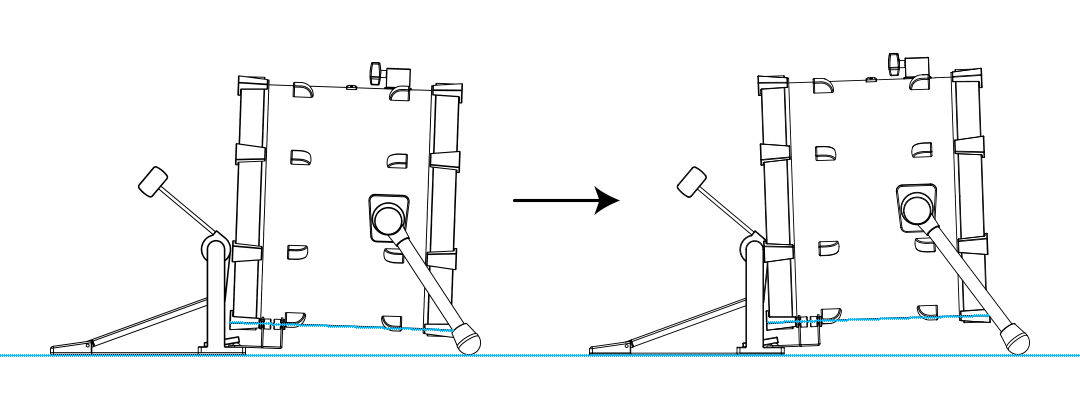
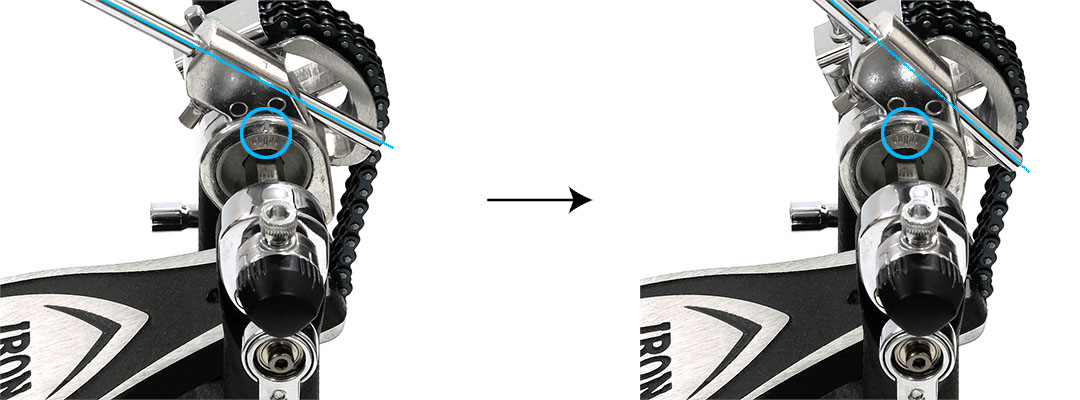
|
What is the "HIHAT" trigger input jack used for? (Excluding EFNOTE 3 (2020))
|
Not used if the EFD-H14 hi-hat is included in the kit configuration. The input jack is used for a hi-hat cymbal which works together with the pedal controller (EFD-HC3). |
Sometimes I hear rim sounds when I hit the head of a pad.
|
If the head tension is loose, adjust it to be tighter again. If it doesn't work enough, try to set the Head-Rim Border on the Trigger screen toward H. For the setting of Head-Rim Border parameter, refer to the Reference Guide. |
Sometimes I hear cross-talk sounds when I hit a pad.
|
Adjust the X-TALK ELIM. parameters on the Trigger screen. Refer to the Reference Guide. |
How can my drum kit be expanded?
|
See the Customize page.
|
Which EFNOTE pad can my sound module connect to?
|
All drum and cymbal pads from EFNOTE can be used, up to maximum number of inputs.
|
Are EFNOTE Drums compatible with other brands' drum and cymbal pads?
|
EFNOTE's advanced sensing system "ELISE" is highly optimized only for EFNOTE pads, and does not perform well with other brands.
|

Microsoft and Windows are either registered trademarks or trademarks of Microsoft Corporation in the United States and/or other countries.
Mac and macOS are trademarks of Apple Inc., registered in the U.S. and other countries and regions.
The Bluetooth® word mark and logos are registered trademarks owned by Bluetooth SIG, Inc..
ASIO is a trademark and software of Steinberg Media Technologies GmbH.